GhostReply
In meetings. Driving. Deep in work. Your texts pile up.
GhostReply handles them — learns your style, reads your calendar, and knows what matters.
10 free replies — no credit card needed
Runs in your Mac's Terminal. Install once, then just type ghostreply to start.
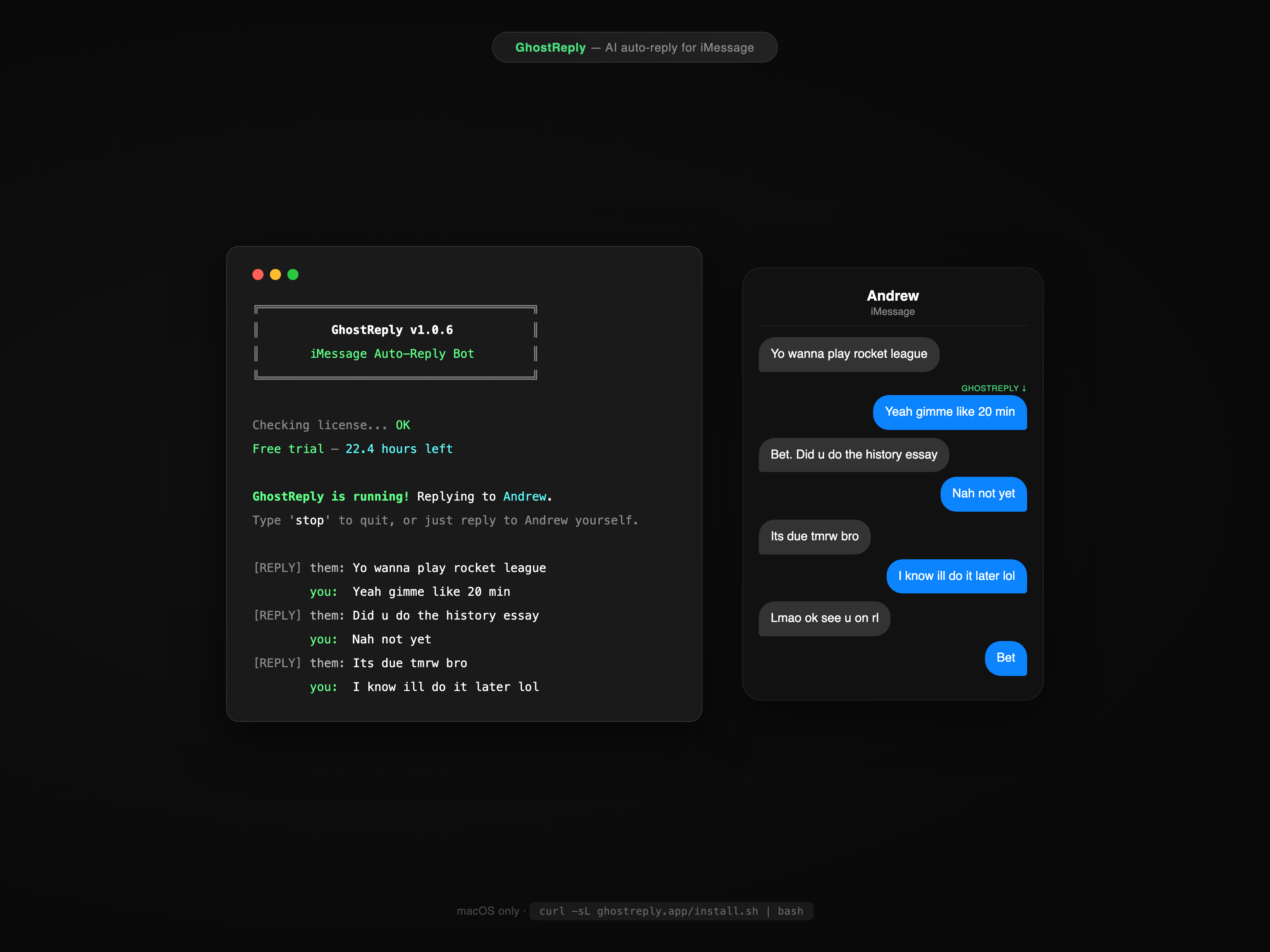
Handles your texts while you work
GhostReply runs in your terminal and auto-replies to iMessages. It learns your texting style, knows your schedule, and replies like you would.
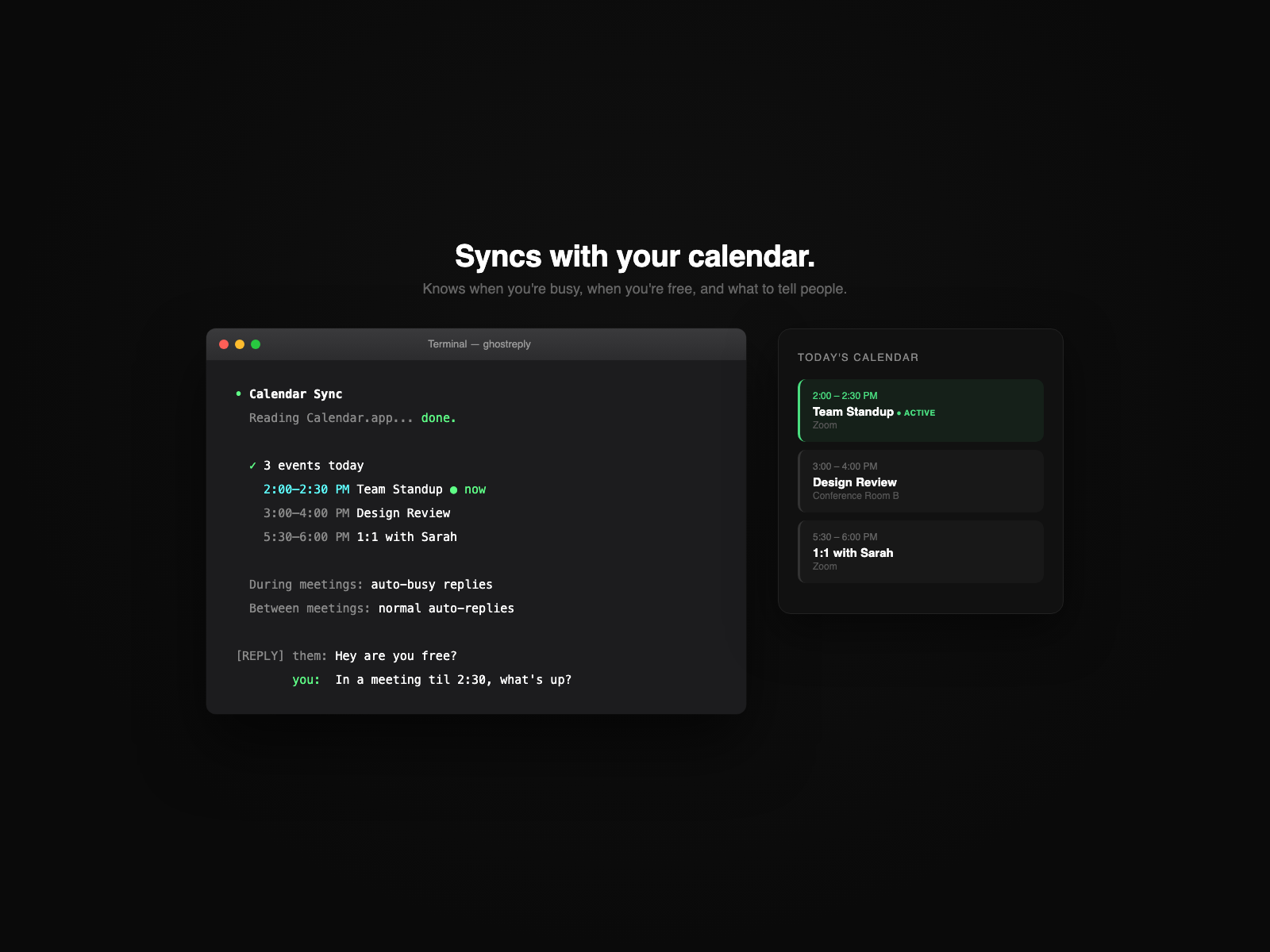
Syncs with your calendar
Reads Calendar.app to know when you're in meetings, when you're free, and what to tell people. Auto-sends busy replies during events.
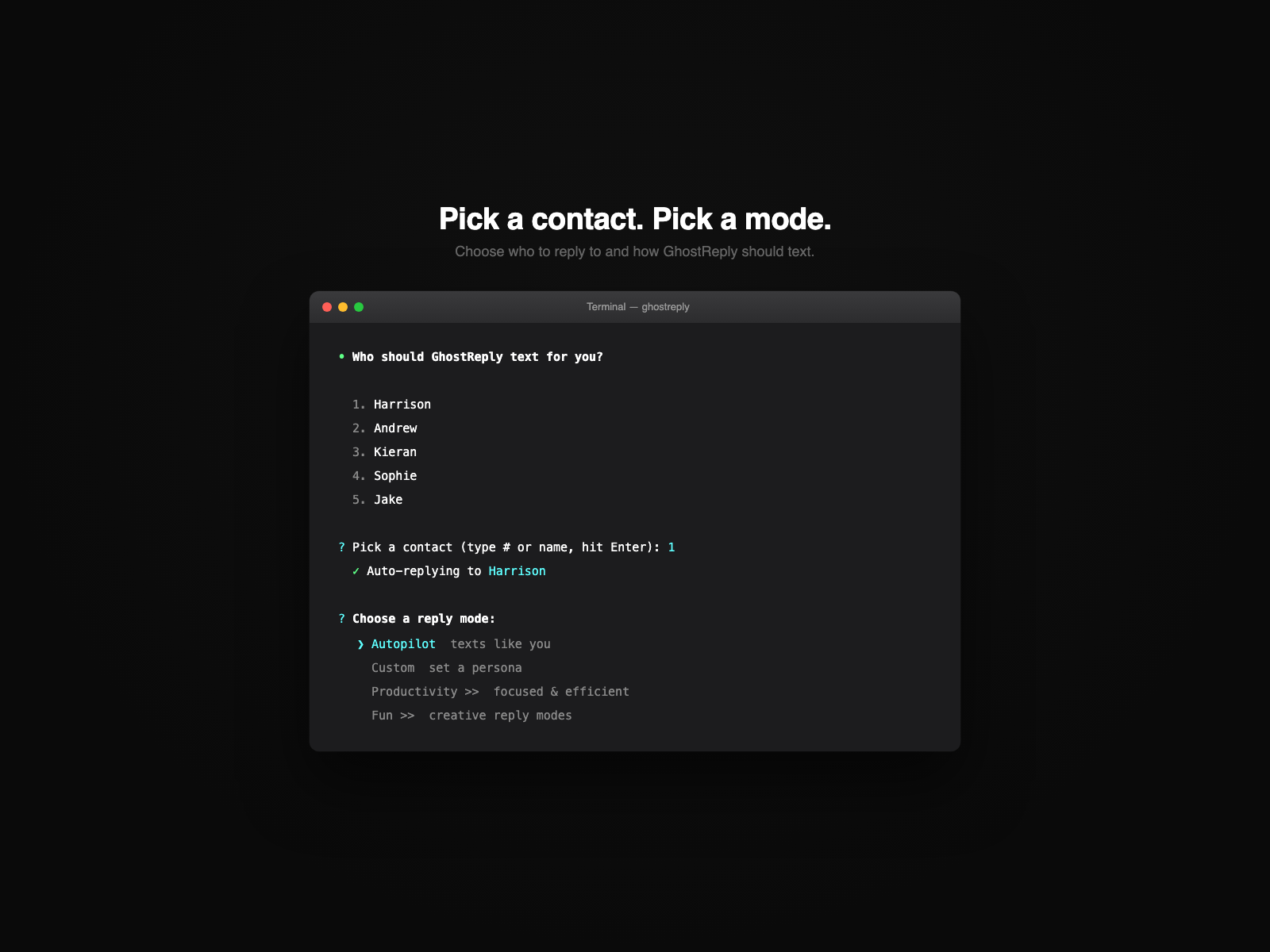
Pick a contact, pick a mode
Reply to one person, your favorites, or everyone. Choose Autopilot to match your style, Productivity for work, or Custom to set any tone.
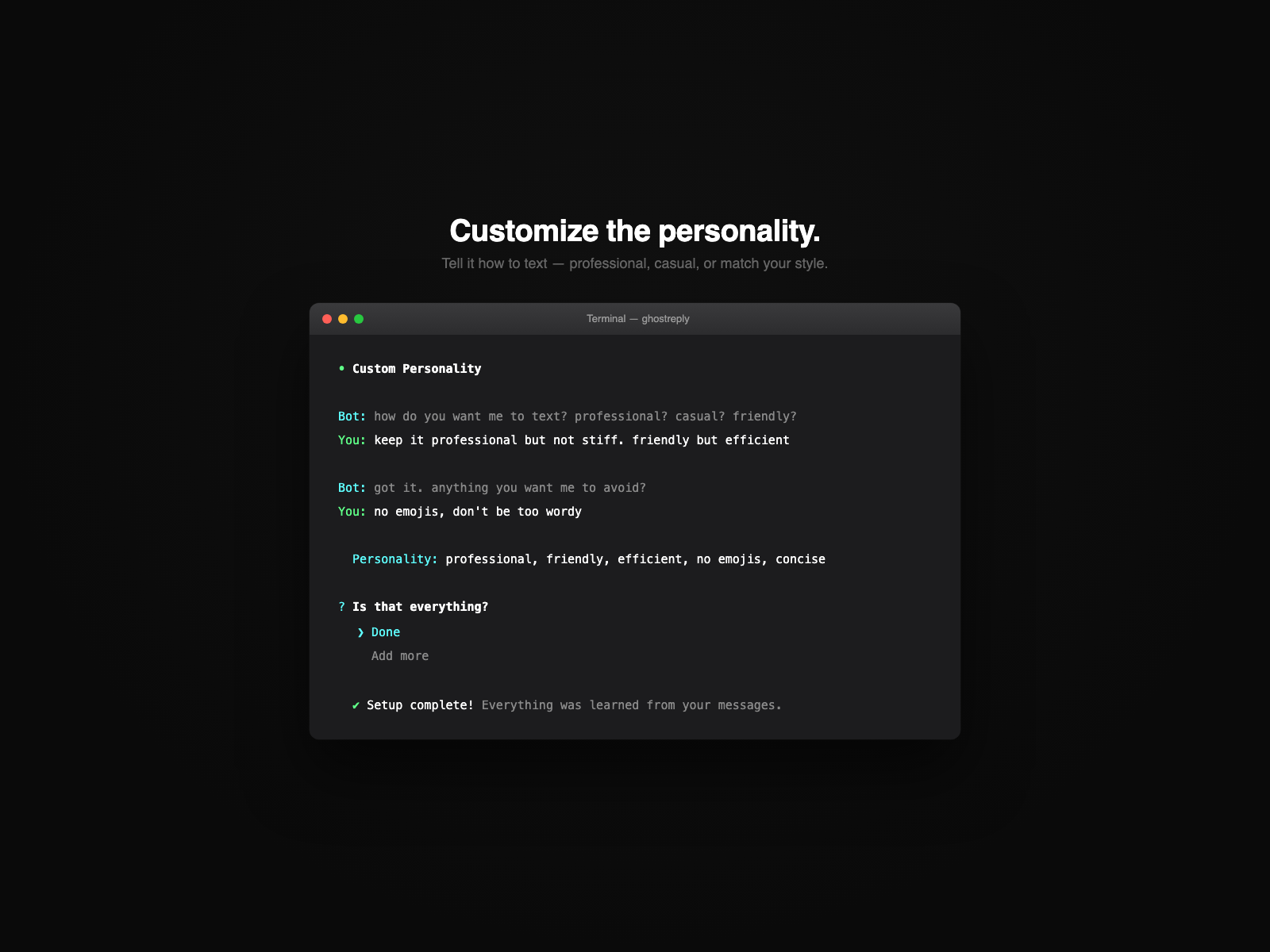
Customize or let it learn
Tell it exactly how to text — professional, casual, friendly — or skip it and let GhostReply match your natural style from your messages.
Built For Your Day
During Meetings
Meeting mode auto-activates from your calendar. Small talk gets quick busy replies. Important messages get flagged — you stay focused.
While You're Working
Someone asks when you're free? GhostReply checks your calendar and responds with your actual availability. No context switching.
Everyday Texts
Quick confirmations, casual check-ins, simple questions — the stuff you'd reply to anyway. GhostReply handles it exactly like you would.
Get Started
Open Terminal and paste this:
Press Cmd + Space, type Terminal, hit Enter. Paste with Cmd + V and press Enter.
What does this do? ▾
Downloads GhostReply to your Mac, adds the ghostreply command, and starts setup. Nothing is installed system-wide — everything lives in ~/.ghostreply/
Run installer
One curl command downloads everything
Python check
Verifies Python 3.10+ is installed
Dependencies
Installs required packages automatically
Ready!
GhostReply is installed and ready to run
10 free replies — no credit card needed. Type trial during setup.
After 10 replies
Buy a license for $4.99 — run ghostreply again and paste your license key. Everything you set up is saved.
Buy a License — $4.99
Features
Smart
Smart Triage
Knows the difference between "lol" and "call me now." Casual texts get auto-replied. Urgent or sensitive messages get flagged to you.
Meeting Mode
Syncs with your Mac calendar. Auto-activates during meetings, sends quick busy replies, and alerts you for anything important.
Scheduled Hours
Set active hours so it only runs when you want. Or use meeting mode to auto-activate during calendar events.
Smart Setup
Detects if you're a student, professional, or casual user from your texts. Auto-configures everything — zero extra questions.
Personalized
Learns Your Style
Scans your real texts to match how you actually type. Your abbreviations, your slang, your vibe.
Knows Your Life
Reads your conversations to learn your friends, interests, and what you talk about. Replies with context.
Customize the Personality
Set the tone — professional, casual, friendly, or creative. It asks you questions to match exactly what you want.
Natural Timing
Replies faster to questions, slower late at night, defers messages at 3am. Feels human, not robotic.
Flexible
Multiple Contacts
Reply to one person, your favorites, or everyone at once. Pick your targeting mode during setup.
Auto-Stops When You Reply
Text back yourself and it stops automatically. You're always in control.
Natural Conversation
Writes naturally enough that it blends into your real conversations. Stays in character — always.
Runs in Terminal
No app to download. Type ghostreply to start, close the window to stop.
Free AI
Uses Groq — free, no credit card. Takes 30 seconds to set up.
10 Free Replies
Try it before you buy. No sign up. Just type "trial" during setup.
100% Local. 100% Private.
GhostReply runs entirely on your Mac. Your messages never touch our servers — they go straight from your Mac to Groq's AI and back. We can't see your texts, your contacts, or your conversations. Ever.
FAQ
Does it reply to everyone?
You choose: one specific contact, your favorites, or everyone at once. Pick your targeting mode during setup.
Does this work on Windows?
No. It needs macOS because it reads your iMessage database directly. Your Mac needs to be on and running GhostReply.
Can people tell it's a bot?
It learns from hundreds of your real texts — your exact style, abbreviations, and message length. It also knows your friends and what you talk about, so replies feel natural and on-topic.
How does the free trial work?
Type "trial" instead of a license key during setup. You get 10 free auto-replies. After that, GhostReply will ask for a license key when you run it again. Your profile and settings are saved — just enter a key and you're back.
Can I customize how the bot talks?
Yes. During setup, it asks you questions to dial in the tone — professional, casual, friendly, whatever fits. You can also set specific topics to focus on or avoid. Or skip it and just use your natural texting style.
How do I stop it?
Just text back yourself. When you send a message to the person the bot is replying to, it stops automatically. You can also type "stop" in Terminal, or just close the Terminal window.
Is this a subscription?
No. $4.99 one-time. You own it forever.
How do I uninstall it?
Run ghostreply --uninstall in Terminal. It removes everything — your config, profile, and the shell alias. To reinstall fresh on the same or another Mac, just run the install command again.
Do my messages go through your servers?
No. Messages go from your Mac to Groq's AI and back. We never see your texts.
GhostReply isn't updating automatically?
If you see "Update check skipped" or you're stuck on an old version, just re-run the install command in Terminal — it'll pull the latest version: curl -sL https://ghostreply.lol/install.sh | bash
Get GhostReply
or try free — 10 replies, no credit card needed
Works on any Mac with iMessage.